
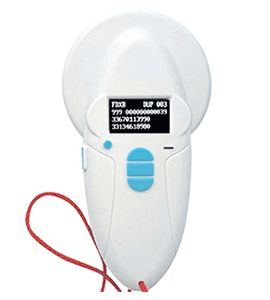
Realtrace V8BT RT100 Handheld reader
Robust, easy to use, compatible with smart phones and suitable for a variety of specialist applications operating with the latest BT4 function for connection with both iOS and Android devices. (Reading of ISO 11784/5 FDX-B and HDX)
Basic User Guide PDF (2.16 MB)
Comprehensive User Manual PDF (3.09 MB)
RT Driver .exe (5.18 MB)
RT Terminal Software .exe (40 kB)

Overview & RESOURCES
Basic User Guide PDF (2.16 MB)
Comprehensive User Manual PDF (3.09 MB)
SOFTWARE
RT Driver .exe (5.18 MB)
RT Terminal Software .exe (40 kB)
Reader Characteristics
| Frequency | 134.2kHz Read & Write ISO 14223 |
| Protocol | ISO11784/5 FDX-A, FDX-B EM4102, HDX |
| Reading Range | Up to 11cm (12mmx2mm, glass tag) |
| Display | 128x64, Black and white. OLED |
| Keys | 4 Buttons |
| Indication | Battery Charge Control & Bluetooth Buzzer |
| USB Port | USB Virtual Comport, Bluetooth Virtual COM Port |
| Power Supply | Lithium Battery, 1400mAh, 3.7V; 5.18Watts/hr |
| Dimensions | 155mm (L) x 82mm (W) x 33mm (H) |
| Net Weight | 155g |
| Charging Mode | Mini USB |
| Accessories | Mini USB Cable, Product Instructions, Battery |
| Compliance Certifications | FCC, CE Certification |
| Memory | Up to 800 ID Numbers |
TIP:
Sometimes, you may need to assign a COM port to a V8BT device connected to your Windows 10 or higher computer.
Here’s how to do it:
- Open Windows Device Manager. Click to expand Ports (COM & LPT).
- Right-click on the target USB device. Select Properties.
- Shift to Port Settings. Click Advanced.
- Select a proper COM port identifier from the drop-down menu of COM Port Number.
- Click OK to confirm.
Technical
V8BT (RT100) Bluetooth Scanner (BT4)
Reads NLIS Eartags
Reads FDX-B & HDX (ISO standard)
Reads FDX-A (Destron, AVID, AEG) and EM4102
Writes to EM4305 Datachips
Scanning distance: from 7cm to 12cm (tag/microchip dependant)
Length 155mm, Width 80mm, thickness: 33mm, weight: 140g
Display: 4 lines of 16 characters
Operating temperature: – 0° to + 40°
Power supply: 3.7V lithium re-chargeable battery
Memory function: storage capacity of 800 identifiers
Connectivity: Bluetooth & USB/Mini USB cable supplied
Features
The V8BT RT100 is an all purpose scanner with wide scan area;
Small size, ideal for in field or desktop applications
Reads multiple types of microchip
Bluetooth BT4 chipset function
Lithium Ion re-chargeable battery operated and portable
Automatic power off, save battery power
12 Months Warranty
Looking to get a Realtrace V8BT RT100 Handheld Reader 4Tags might be able to help! Click HERE to find out more.
Looking to get Realtrace V8BT Replacement Battery 4Tags might be able to help! Click HERE to find out more.
Looking to get Replacement USB 2.0 5-Pin Mini-B Cable 4Tags might be able to help! Click HERE to find out more.
Looking to get Realtrace V8BT RT100 Reader Case 4Tags might be able to help! Click HERE to find out more.
This software is a tool supplied free of charge to all users of the RFID Realtrace Bluetooth reader.
It enables the Bluetooth communication to be automatically restored between a PC running on Windows and the RFID RealTrace reader if it is cut.
You will find that once the communication has been established between a PC and the RealTrace reader both appliances which were previously paired up remain connected providing that they are separated by no more than 10 meters. The communication is cut if the distance is over 10
meters, and a search and pairing up must be performed to restore transmissions.
The communication is also cut when the RealTrace reader switches off after several minutes on standby to save energy in the 9 volt battery.
The lost communication in both these cases is connected to the way Bluetooth technology operates as well as the Windows operating system. The « Realtrace terminal » software reduces this problem by enabling communication between a PC and the RFID reader to be quickly and
easily restored.
Initial parameterization of the « RealTrace Terminal » software
After installing the software on your PC, click on « File » then « Properties » then enter the Bluetooth’s communication port number as well as the following data :
– bits per second : 9600
– data bits : 8
– stop bits :1
– parity : none
– flow control : none
Using the software
« File » menu
The « Save », « Delete », « Print» and « Leave » functions are standard.
When selected, the « Link to an application » function enables the data sent by the reader to a PC to be linked with a Windows application, simultaneously with the display in the « RealTrace Terminal » window.
« Connection » Window
If there is a break in the communication between the PC and the reader simply select «connect » to automatically restore connection after a maximum period of 15 seconds.
The time remaining before the automatic connection is displayed in the window in the bottom right of the screen. Obviously the reader must be switched on before reconnection can occur, and it must be within a radius of 10 meters of the PC which itself must be functioning.
« Option » menu
The « display all the data » heading enables the screen display of the data sent by the reader to be modified. If this heading is selected all the charact ers received are displayed i.e. the order number, type of transponder (EM4102, FDXA,FDXB, HDX), chip identifier number and CRC.
If the « display all the data » heading is not selected, only the order number and identifier are displayed on the screen.