
Gallagher TWR-5 Weigh Scale, Data Collector & EID Tag Reader
The Gallagher TWR-5 is the next generation of the Touch Weigh Scale (TW) family of Weigh Scale and Data Collectors and includes a fully integrated EID reader.
In addition, the TWR-5 supports the simultaneous recording of up to 9 traits and life data recording. The user interface is easy to use and simple to understand.
Gallagher TWR-5 Weigh Scale, Data Collector & EID Tag Reader User Guide (9.40 MB) - PDF


Overview & RESOURCES
User Guide Download Information
Gallagher TWR-5 Weigh Scale, Data Collector & EID Tag Reader User Guide (9.40 MB) - PDF
TWR-5 Weigh Scale & Reader
Gallaghers top-of-the-line weigh scale reader. The TWR-5 has all the smarts to help you turn livestock performance into profit.
Simple to operate with market-leading touchscreen weigh scale. The TWR-5 makes weighing, data collection and data management easier than ever before. The simple navigation and easy-to-use interface was designed in partnership with farmers. The convenience of a full QWERTY keyboard makes data entry faster and easier.
In-yard data collection is just the beginning. Use the TWR-5 Weigh Scale with Animal Performance Plus and take full advantage of the entire Gallagher ecosystem: store your animal records securely in the Cloud, create and use pre-defined drafts lists, use powerful filters for deeper analysis of your livestock performance.
Use with a Hand Held Reader or go hands-free by simply connecting to an EID Antenna Panel.
Overview
| Wifi | Yes | 9 | |
| Yes | Yes | ||
| Drafting | Yes | Yes | |
| No | Warranty | 2Year | |
|
295mm
|
475mm | ||
| 245mm | 4.5kg |

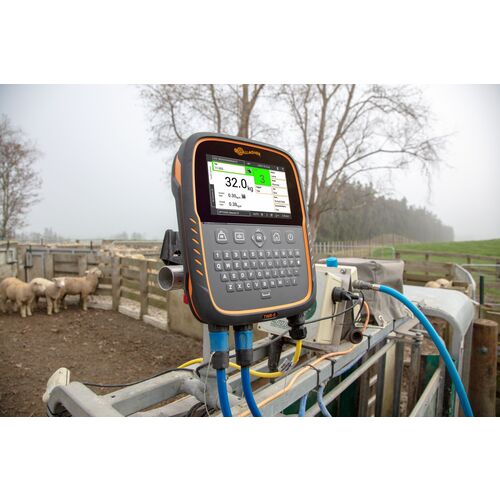
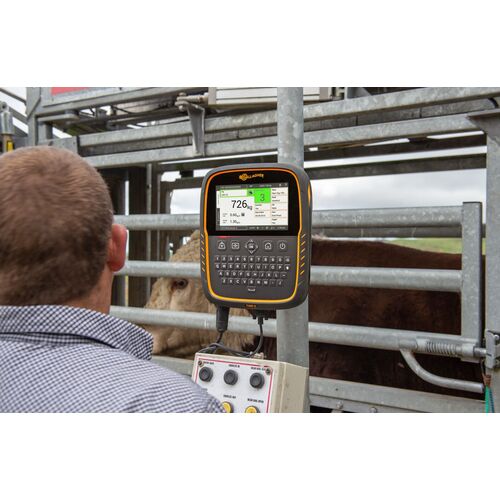
Market leading touch screen technology
Bright, high clarity, outdoor-readable touch screen. A large 7” screen is easily read in direct sunlight
Sync your animal data without leaving the yards
WiFi connectivity allows you to synchronise your animal data straight to the Gallagher Animal Performance web and mobile app, ensuring all livestock information is up-to-date and available on your mobile app, P.C and other weighing hardware.
Simple to navigate and execute tasks
Extremely intuitive, easy to use interface that was designed in partnership with farmers. Made even simpler with the convenience of a full QWERTY keyword to make data entry easier and faster.
Collect and record medication doses, comprehensive life data and traits with ease
Collect, record and review more information than simply just weight. Record up to 9 extra pieces of animal life data, or traits, activities or treatments per session, including condition score, weight based calculation, medication doses etc
Onboard help, 24/7
The entire product manual is loaded into the product. No matter where you are, or what you are trying to do help is only one click away and tailored to the screen you are currently on.
Animal notes and note alerts
Record notes against animals on the spot for later review and stop any action until acknowledged by the operator
Animal data analysis on device
View individual weight gain graphs and weight distribution plots for all animals in a weighing session at any time, including while an animal is being weighed
Flexible connectivity options for all use cases
Whether connecting to drafters or readers via a serial cable, to a PC via USB, or utilising the Bluetooth and WiFi wireless options for portable EID reading or uploading data, the TW-1 has every option available
Sort your animals in up to 9 groups with custom drafting
Draft or sort up to 9 groups by weight, weight gain, predetermined EID list or by recorded life data and traits identified with bright coloured drafting groups. The TWR-5 can also drive an automatic drafting gate
No loadbar cables needed – compatible with Wireless Loadbars
Bluetooth connectivity to Wireless Loadbars removes the hassle and risk of cables being chewed by rodents, stood on by stock or damage to traditional scale connectors
Tough, rugged exterior
Farm ready design, and toughened, scratch proof glass screen makes it suitable for all environments
Flexible installation options
Includes adjustable mounting bracket and hardware for optimum screen visibility or easily used sitting flat or handheld
The complete package
Includes tough and convenient Gallagher carry case, adjustable mounting bracket and mounting hardware, microfiber screen cloth, battery charging cable, mains charging cable, and USB cable for PC connection
BOX CONTENTS
The Gallagher TWR-5 box contains:
- Carry Bag
- TWR-5 weighing unit
- 110V - 230V Mains AC adapter
- USB cable
- USB flash drive
- 12V battery cable with alligator clips
- Mini Serial Adapter (2M1709)
- Mounting bracket and mounting hardware
UNDERSTANDING THE TWR-5 WEIGHING UNIT


CHARGING THE BATTERY
To ensure optimum performance of the TWR-5, the internal battery may need to be charged for up to 16 hours before first time use.
Important: If the TWR-5 is to be stored for an extended period, this should be in a cool dry place. For optimum battery life, store the TWR-5 at 50% capacity.
Always charge the battery indoors.
1. Connect the power adapter at the base of the unit and plug the TWR-5 into a power outlet and switch ON. The charging icon will display on the screen.
Warning: The power adaptor is intended for indoor use only. Do not expose to rain or dampness. The TWR-5 must not be powered by any power source exceeding 13 V, as it may damage the product and void the warranty.
2. When the charge shows 100% the TWR-5 is ready to use with or without the power adapter.

Note:
- When the TWR-5 is in use, the battery icon will display and show remaining charge.
- When using the scale and the charge level falls below 10% the battery icon will flash with a red outline. You will have about 30 minutes to complete the weighing session before the TWR-5 must be charged.
- When the charge level becomes critical the unit will shut down.
- To check remaining run time at current settings, from the Home screen, go to Settings > About > Battery.
- The battery error icon will display if the battery is too hot (above +45C) or too cold (below 0C). The Scale will keep operating while plugged in but will not charge properly until at room temperature.
INSTALLATION
- Installing the TWR-5
- Installing the loadbars
- TWR-5 Position
- Installing the Antenna Panel
- Attaching the Antenna Panel
The TWR-5 can be placed on a table top or mounted on the bracket supplied.
Installing the Scale bracket
The bracket can be mounted on a flat vertical surface, a round post, or a rail.
To mount the bracket on a flat vertical surface, or a round wooden post, use the 4 x tek screws included with the unit.

To mount the bracket on either a vertical or horizontal bar, use the ‘U’ bolts included with the unit.
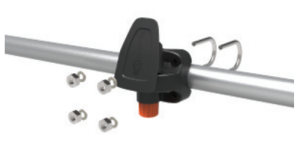
Important: It is not recommended to mount the TWR-5 bracket on the weighing crate or chute as interaction with the scale can impair weighing performance.
If using loadbars, follow these steps:
1. Select a weighing site that provides a solid, level and well drained surface.
2. Ensure the loadbars and platform are well secured and clear of any obstructions.
3. Either bolt the loadbars to the concrete pad or locate them on studs set into the concrete. It is important that the loadbars and platform sit flat without any rocking or twisting to avoid weighing inaccuracies.
Note: It may be necessary to shim the loadbars or platform to ensure there are no twisting pressures within the platform. Weights should be evenly distributed over the top of the weigh bars.
4. For Wired Loadbars: Connect the loadbar cables to the TWR
For Wireless Loadbars: The TWR must be within 8-10m of the loadbars. Refer to the Gallagher Loadbars Instructions for further installation information.
A beep will sound indicating a successful connection / disconnection of the loadbars.
WARNING – Do not weld the loadbars or any structure that they are attached to. Loadbars contain sensitive electronic devices which will be damaged by welding. Damage caused by welding will void warranty.
Clear of the platform to ensure it does not interfere with the flow of animals during the weighing cycle
Within easy reach of the loadbar leads
Within easy reach of the operator (for manual weighing)

The TWR-5 has an internal reader, that when connected to a Gallagher Antenna panel will capture the Electronic ID tag data.
To weigh animals in a crush, you will need:
- Gallagher Antenna Panel kit
- 4m Antenna Extension Cable G05600 or 6m Antenna Extension Cable G05602
Note: A short adapter cable G05601 may be required on early versions of the Sheep Auto Drafter made prior to 2018.
To mount your Antenna panel, refer to the instructions included with the panel.
Important: Use the defined mounting holes, because drilling through the Antenna Panel will damage the antenna.
1. Ensure the TWR-5 is turned OFF.
2. On the Antenna Panel, unscrew the Amphenol connector locking nut from the Amphenol socket and pull it down to unplug from the Antenna Panel.

3. Connect the extension cable to the Amphenol connector and tighten, then connect the other end of the extension cable to the Antenna connector on the base of the TWR-5.
4. Tighten the locking nut.
5. Refer to Connecting Equipment to the TWR-5 (p. 8) to complete the EID Reader connection on the TWR-5.
Looking to get a Gallagher TWR-5 Weigh Scale, Data Collector & EID Tag Reader 4Tags might be able to help! Click HERE to find out more.