
Gallagher TW-3 Weigh Scale & Data Collector
Simple to operate, market-leading touch screen weigh scale with the added ability to record animal life data and traits. Ideally suited to farmers wanting to record and review more information than simply weight, the TW-3 can record up to 3 traits per session.
Gallagher TW-3 Weigh Scale Quick Start Guide INT User Guide (9.1 MB) - PDF


Overview & RESOURCES
User Guide Download Information
Gallagher TW-3 Weigh Scale Quick Start Guide INT User Guide (9.1 MB) - PDF
TW-3 Weigh Scale & Data Collector
Simple to operate, market-leading touch screen weigh scale with the added ability to record animal life data and traits. Ideally suited to farmers wanting to record and review more information than simply weight, the TW-3 can record up to 3 traits per session.
The touch screen weigh scale range makes weighing and data management easier than ever before with simple navigation and easy to use interface that was designed in partnership with farmers. The TW-3 has the added convenience of a full QWERTY keyboard to make data entry faster and easier.
View, manage and analyse your animal data, all within the weigh scale or connect to WiFi and sync your data with your Animal Performance web & mobile app for seamless data management and analysis tools across all your devices.
Overview
| Wifi | Yes | 3 | |
| Yes | Yes | ||
| Drafting | Yes | No | |
| Yes | No | ||
| Warranty | 2 Year | ||
|
235mm
|
295mm | ||
| 2.2kg | 80mm |

Market leading touch screen technology
Bright, high clarity, outdoor-readable touch screen. A large 7” screen is easily read in direct sunlight
Sync your animal data without leaving the yards
WiFi connectivity allows you to synchronise your animal data straight to the Gallagher Animal Performance web and mobile app, ensuring all livestock information is up-to-date and available on your mobile app, P.C and other weighing hardware
Simple to navigate and execute tasks
Extremely intuitive, easy to use interface that was designed in partnership with farmers. Made even simpler with the convenience of a full QWERTY keyword to make data entry easier and faster
Collect and record medical doses, life data and traits with ease
Collect, record and review more information than simply just weight. Record up to 3 extra pieces of animal life data, or traits, activities or treatments per session. Including condition score, weight based calculation, medication doses etc
Onboard help, 24/7
The entire product manual is loaded into the product. No matter where you are, or what you are trying to do help is only one click away and tailored to the screen you are currently on
Animal notes and note alerts
Record notes against animals on the spot for later review and stop any action until acknowledged by the operator
Animal data analysis on device
View individual weight gain graphs and weight distribution plots for all animals in a weighing session at any time, including while an animal is being weighed
Flexible connectivity options for all use cases
Whether connecting to drafters or readers via a serial cable, to a PC via USB, or utilising the Bluetooth and WiFi wireless options for portable EID reading or uploading data, the TW-1 has every option available
Sort your animals in up to 9 groups with custom drafting
Draft or sort up to 9 groups by weight, weight gain, predetermined EID list or by recorded life data and traits identified with bright coloured drafting groups. The TW-3 can also drive an automatic drafting gate
No loadbar cables needed – compatible with Wireless Loadbars
Bluetooth connectivity to Wireless Loadbars removes the hassle and risk of cables being chewed by rodents, stood on by stock or damage to traditional scale connectors
Tough, rugged exterior
Farm ready design, and toughened, scratch proof glass screen makes it suitable for all environments
Flexible installation options
Includes adjustable mounting bracket and hardware for optimum screen visibility or easily used sitting flat or handheld
The complete package
Includes tough and convenient Gallagher carry case, adjustable mounting bracket and mounting hardware, microfiber screen cloth, battery charging cable, mains charging cable, and USB cable for PC connection
BOX CONTENTS
The Gallagher TW- box contains:
- Carry Bag • TW- weighing unit
- 110V - 230V Mains AC adapter
- USB cable
- USB flash drive
- 12V battery cable with alligator clips
- Mini Serial Adapter (2M1709)
- Mounting bracket and mounting hardware
UNDERSTANDING THE TW-3 WEIGHING UNIT
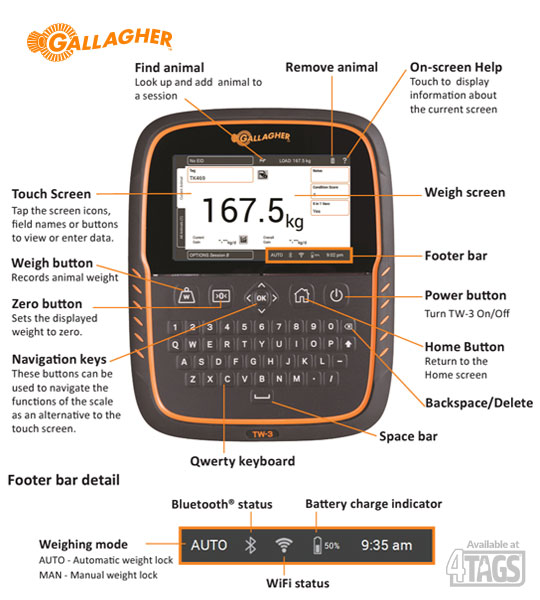
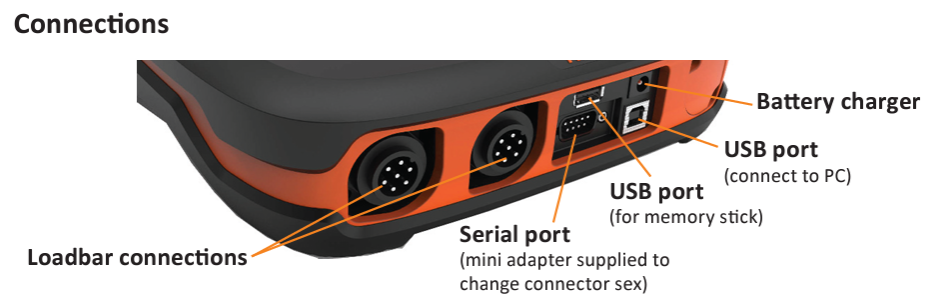
CHARGING THE BATTERY
To ensure optimum performance of the TW-3, the internal battery may need to be charged for up to 16 hours before first me use.
Important: If the TW-3 is to be stored for an extended period, this should be in a cool dry place. For optimum battery life, store the TW-3 at 50% capacity.
Always charge the battery indoors.
| Operating Temperature | -20o to 50oC -5o to 120oF |
| Environmental Protec on Rating | IP67 |
| Input Voltage (nominal) | 12 V DC |
| Input Voltage (range) | 10.5 - 14,5 V DC |
| Estimated battery run time | 16 hours at 60% brightness or 12 hours at 100% brightness |
1. Connect the power adapter at the base of the unit and plug the TW-3 into a power outlet and switch ON. The charging icon will display on the screen.
Warning: The power adaptor is intended for indoor use only. Do not expose to rain or dampness. The TW-3 must not be powered by any power source exceeding 14,5 V, as it may damage the product and void the warranty.
2. When the charge shows 100% the TW- is ready to use with or without the power adapter.

Important:
When the TW-3 is in use, the battery icon will display and show remaining charge.
When using the scale and the charge level falls below 10% the battery icon will flash with a red outline. You will have about 30 minutes to complete the weighing session before the TW-3 must be charged.
When the charge level becomes critical the unit will shut down.
To check remaining run time at current settings, from the Home screen, go to Settings > About > Battery.
The battery error icon will display if the battery is too hot (above +45oC) or too cold (below 0oC). The Scale will keep operating while plugged in but will not charge properly until at room temperature.
INSTALLATION
The TW-3 can be placed on a table top or mounted on the bracket supplied.
Installing the Scale bracket
The bracket can be mounted on a flat vertical surface, a round post, or a rail.
To mount the bracket on a flat vertical surface, or a round wooden post, use the 4 x tek screws included with the unit.

To mount the bracket on either a vertical or horizontal bar, use the ‘U’ bolts included with the unit.
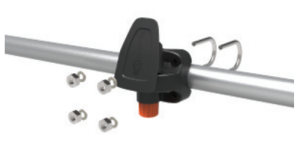
Important: It is not recommended to mount the TW-3 bracket on the weighing crate or chute as interaction with the scale can impair weighing performance.
If using loadbars, follow these steps:
1. Select a weighing site that provides a solid, level and well drained surface.
2. Ensure the loadbars and plaƞ orm are well secured and clear of any obstructions.
3. Either bolt the loadbars to the concrete pad or locate them on studs set into the concrete. It is important that the loadbars and platform sit flat without any rocking or twisting to avoid weighing inaccuracies.
Note: It may be necessary to shim the loadbars or platform to ensure there are no twisting pressures within the platform. Weights should be evenly distributed over the top of the weigh bars.
4. For Wired Loadbars: Connect the loadbar cables to the TW-3
For Wireless Loadbars: The TW-3 must be within 8-10m of the loadbars. Refer to the Gallagher Loadbars Instructions for further installation information.
A beep will sound indicating a successful connection / disconnection of the loadbars.
WARNING – Do not weld the loadbars or any structure that they are attached to. Loadbars contain sensitive electronic devices which will be damaged by welding. Damage caused by welding will void warranty.
Clear of the platform to ensure it does not interfere with the flow of animals during the weighing cycle
Within easy reach of the loadbar leads
Within easy reach of the operator (for manual weighing)

Looking to get a Gallagher TW-3 Weigh Scale & Data Collector 4Tags might be able to help! Click HERE to find out more.